Rich Text
The difference between rich text and ordinary text is:
- Normal text does not support interaction, mouse / touch sensing is off; rich text support.
- Normal text does not support linking and graphic mixing; rich text support.
- Normal text does not support HTML syntax (but different styles can be implemented using UBB); rich text support.
Click in the main toolbar Button to generate a rich text.
Instance properties
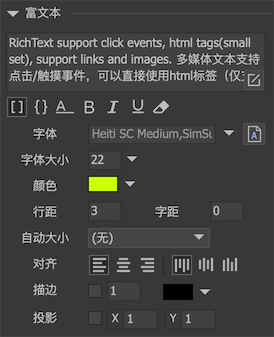
-
 Set text to support UBB syntax. Using UBB syntax can make a single text contain multiple styles, such as font size, color, etc. Please refer to UBB syntax。
 -
 When selected, the text can express a text parameter using syntax such as {count = 100}. Please refer to the text template。
 -
 Set the text to a single line. Single-line text does not wrap automatically, and newline characters are ignored.
 -
 Set the text to bold.
 -
 Set the text to italic.
 -
 Set the text to underline.
 -
 Indicates that the text is only used as an editor preview and will be automatically cleared when publishing.
 -
textSet the text content. Rich text can be used directlyHTML syntax。 When a new line is needed, you can do it in the editorPress enter directly, Or use the html tag "& lt; br / & gt;". The code assignment requires a newline. You can use "\ n". Some engines, such as LayaAir, may not support a carriage return and line feed. Try using & lt; br / & gt ;. -
FontSet the font used for text. ** You don't need to set the font once for each text. ** In the project properties, you can set the default font used for all text in the project. When runningUIConfig.defaultFontUniform settings. If you need to use bitmap fonts, you can drag font resources from the resource library here. If you use TTF fonts, then you need to install the fonts into the operating system, then enter the font name here, or click the A button next to it to select. -
font sizeSets the font size used for text. If you are using a bitmap font, you need to set "Allow dynamic font size change" for the bitmap font for the options here to be effective. -
colourSet the text color. If you are using a bitmap font, you need to set "Allow dynamic color changes" to the bitmap font for this option to take effect. -
Line spacingThe pixel pitch of each row. -
KerningPixel pitch for each character. (Neither H5 engines are currently supported) -
Auto sizeAuto width and heightThe text does not wrap, and both the width and height grow to fit the entire text.Automatic heightThe text is typeset with a fixed width, and it wraps automatically when it reaches the width, and the height grows to accommodate the entire text.Automatic shrinkThe text is typeset with a fixed width. When the width is reached, the text is automatically reduced so that all text is still displayed. If the content width is less than the text width, no processing is done.noText is typeset with fixed width and height and does not wrap automatically.
-
AlignedSet the alignment of the text. -
StrokeSets the stroke effect of the text. The stroke weight value cannot be too large, otherwise the effect will be strange. Strokes are implemented differently in each engine, and the effects are different, and the effects of the editor are for reference only. -
projectionSets the drop shadow effect of the text. The projection effect can be regarded as a simplified stroke effect. The stroke is in all directions, and the projection has only one direction. Projection and stroke share a single color setting.
GRichTextField
Rich text supports dynamic creation, for example:
GRichTextField aRichTextField = new GRichTextField (); aRichTextField.SetSize (100,100); aRichTextField.text = " <a href='xxx'>Hello World</a> ";
The method to listen for link clicks in rich text is (this event is bubbling, that is, you can not listen on rich text, you can listen on its parent or grandfather components):
// Unity / Cry / MonoGame, the data in the EventContext is the href value.
    aRichTextField.onClickLink.Add (onClickLink);

    // AS3 / Egret, TextEvent.text is the href value.
    aRichTextField.addEventListener (TextEvent.LINK, onClickLink);

    // Egret, TextEvent.text is the href value.
    aRichTextField.addEventListener (TextEvent.LINK, this.onClickLink, this);

    // Laya, the parameter of onClickLink is the href value.
    aRichTextField.on (laya.events.Event.LINK, this, this.onClickLink);

    // Cocos2dx, EventContext.getDataValue ().asString () is the value of href.
    aRichTextField-> addEventListener (UIEventType :: ClickLink, CC_CALLBACK_1 (AClass :: onClickLink, this));

    // CocosCreator, the first parameter of onClickLink is the href value, and the optional second parameter is fgui.Event
    aRichTextField.on (fgui.Event.LINK, this.onClickLink, this);
The most important feature of rich text is support for HTML parsing and rendering. Plain text style tags, such asFONT、B、I, These are generally well supported. Some other object tags, such asA、IMG and others support different strengths in each engine:
-
AS3/StarlingSupportAtags andIMGtags, support for shuffled images / movieclips and external images in the UI library. Support for custom hyperlink styles:aRichTextField.ALinkFormat = new TextFormat (...);
aRichTextField.AHoverFormat = new TextFormat (...);
- `Egret` Support `A` label. Mixed graphics and text are not supported.

- `Laya` Support `A` label and IMG`Tags, only supports mixing external images, **Does not support images and movieclips in the UI library**。 The essence of the Laya version of GRichTextField is to wrap Laya's HTMLDivElement, which can be accessed in the following ways:

```csharp
var div: HtmlDivElement = aRichTextField.div;
-
UnitySupportA、IMG、INPUT、SELECT,Pand so on. Please refer here -
Cocos CreatorSupportA、IMG。 Supports package and external images, but does not support movieclip (movieclip is displayed as a single frame). The essence of the Creator version of GRichTextField is to wrap cc.RichText.
HTML syntax
Unity / MonoGame version has more complete support for HTML parsing.
-
IMGSupport for shuffled images / movieclips and external (network) images in the UI library. The ability to load external images can be achieved viaExtended Loaderprovide. Note that the img tag needs to end with "/ & gt;", not "& gt;". E.g:<img src='ui://package name/image name'/> // You can also specify the size of the image <img src='ui://package name/image name' width='20' height='20'/> // You can also specify the size of the image with a percentage <img src='ui://package name/image name' width='50%' height='50%'/> -
ADisplay a hyperlink. E.g:<a href='xxx'>link text</a>Supports defining the style of hyperlinks. If it is modified globally, you can use the static properties of HtmlParseOptions, for example:
// Note: Global settings should be called before creating rich text.
// Set whether all links in the entire project are underlined HtmlParseOptions.DefaultLinkUnderline = false;
// Set the color of the hyperlink HtmlParseOptions.DefaultLinkColor = ...; HtmlParseOptions.DefaultLinkBgColor = ...; HtmlParseOptions.DefaultLinkHoverBgColor = ...;
If you just want to define a single rich text link style, then you can:

```csharp
HtmlParseOptions options = aRichTextField.richTextField.htmlParseOptions;
    options.linkUnderline = false;
    options.linkColor = ...;
    options.linkBgColor = ...;
    options.linkHoverBgColor = ...;
If each link in the same text needs a different color, wrap it around with a color label around the link label.
-
INPUTThe following syntaxes are supported:// show a button <input type='button' value='标题'/> // Show an input box <input type='text' value='文本内容'/>If you need to display the button, you need to define the resource corresponding to the button first, otherwise it cannot be displayed. E.g:
HtmlButton.resource = "ui:// package name / button name";For the input box, you can define the border color and border size of the input box, for example:
HtmlInput.defaultBorderSize = 2;HtmlInput.defaultBorderColor = ...; -
SELECTUse this tab to display a drop-down selection box. E.g:<select name=''><option value='1'>1</option><option value='2'>2</option></select>Before using the drop-down box, you need to define the resources corresponding to the drop-down box, otherwise it cannot be displayed. E.g:
HtmlSelect.resource = "ui:// package name / drop-down box component name"; -
PFor example, to display a centered image:<p align='center'><img src=''/></p>By default, GRichTextField treats text as an HTML fragment, that is, it retains whitespace characters such as spaces and carriage returns. If you want to treat it as complete HTML without leaving blanks, you can use the following methods:
- Use HtmlParseOptions:
HtmlParseOptions options = aRichTextField.richTextField.htmlParseOptions;
options.ignoreWhiteSpace = true;
- Wrap text content with HTML or BODY tags, for example:
```csharp
aRichTextField.text = " <body> text </body> ";
If you want to access objects in HTML, you can use the following methods:
// Number of HTML elements in the current text
    int cnt = aRichTextField.richTextField.htmlElementCount;

    // Get the HTML element with the specified index, 0 = <index <cnt
    HtmlElement element = aRichTextField.richTextField.GetHtmlElementAt (index);

    // Get the HTML element with the specified name. The name is specified by the name attribute in the HTML element.
    element = aRichTextField.richTextField.GetHtmlElement (elementName);

    // Get the HTML object corresponding to the HTML element. HTML对象的类型有HtmlImage、HtmlLink、HtmlInput等。
    IHtmlObject htmlObject = (IHtmlObject)element.htmlObject;
    if(element.type==HtmlElementType.Image)
    {
        HtmlImage image = (HtmlImage)htmlObject;
    }
As another example, if you want to make the effect of moving the mouse over a link to display information:
int cnt = richText.htmlObjectCount;
    for (int i = 0; i <cnt; i ++)
    {
        IHtmlObject obj = richText.GetHtmlObjectAt (i);
        if (obj is HtmlLink)
        {
            ((HtmlLink) obj) .shape.onRollOver.Add (onLinkRollOver);
            ((HtmlLink) obj) .shape.onRollOut.Add (onLinkRollOut);
        }
    }

    // You can call GRoot.inst.ShowPopup, GRoot.inst.ShowTooltips or other processing in the processing of RollOver and RollOut.
You can also extend and implement your own IHtmlObject. You need to implement an IHtmlPageContext interface yourself and assign it to the htmlPageContext property of the RichTextField. Read the source code for details.